novusnow.ca是一家比较实惠的宽带提供者,我家的宽带是1G对等的宽带,一个月55CAD,(不含税,我住的地方还没有支持2.5G,有一些可惜。)
测速网站:
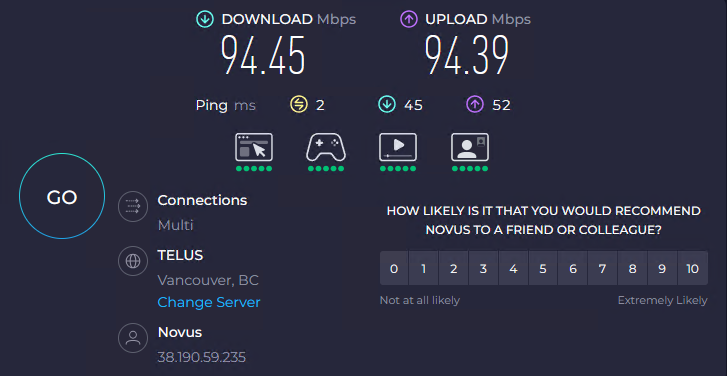
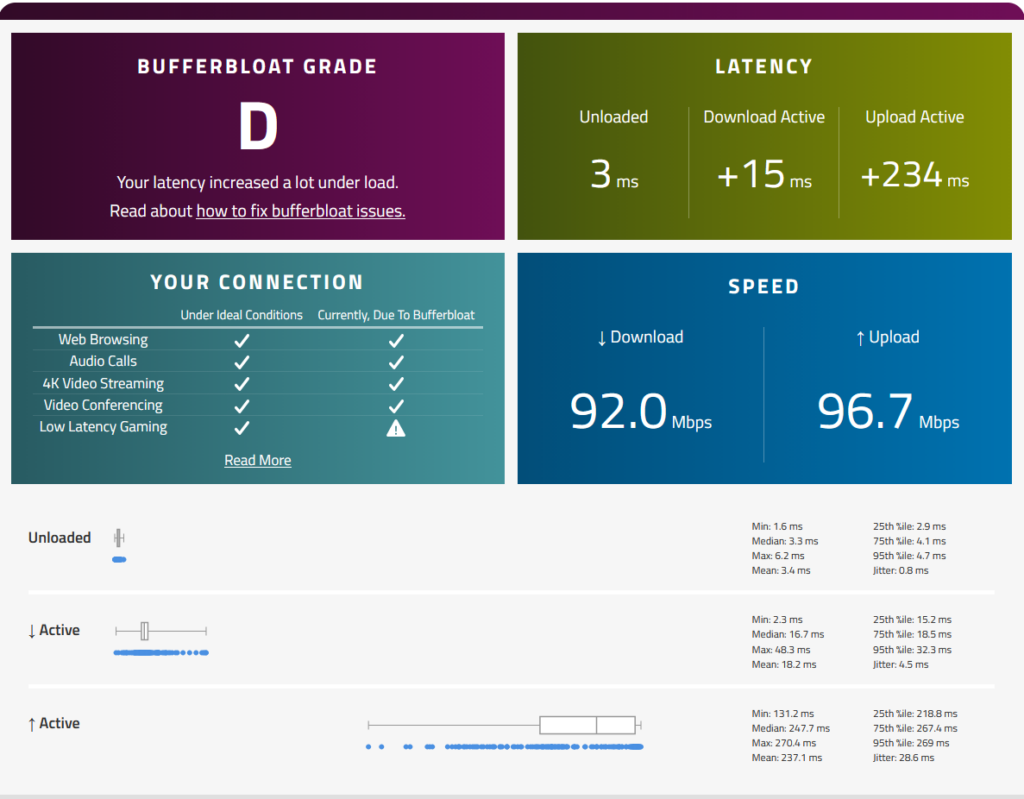
以下分別為 Speedtest、Bufferbloat 兩種工具平台進行測試供參考。
Speedtest by Ookla:https://www.speedtest.net/zh-Hant
Bufferbloat by Waveform:https://www.waveform.com/tools/bufferbloat
如何使用自己的路由器 Sources
Registering devices
Learn more about using your device on the Novus network, and find out how you can register a device.
In order to use a device on the Novus network, such as a router, desktop or laptop, you will need to register it onto the Novus network.
- Connect your device to the Novus network using an ethernet cable.
- Open a web browser. You should be redirected to the online registration page
- On the online registration page, there’s a button that says, “Go to online registration system.” Click on this button.
- You will be asked to enter your username & password which would be the credentials you used to sign up for MyNovus. You should register for an account if you haven’t already.
- After you’ve entered your username and password, you will be directed to the Novus authentication page.
- Towards the middle of the page, there will be a button: Authenticate Me. Click on this button.
You can have one device registered on the Novus network.
If you don’t get automatically redirected to the Online registration page, there may be something wrong with your network connection. Try typing in www.novusnow.ca manually, and that may work to redirect you. If not, please contact us.